
Download USB Audio ASIO Driver – USB audio interface, ASIO driver, low-latency audio, music production, audio interface driver, audio software, real-time audio, professional audio, digital audio workstation, audio recording
Overview
The USB Audio ASIO Driver is a specialized utility designed for musicians, audio engineers, and producers who rely on precise, low-latency audio performance when using USB audio interfaces with digital audio workstations (DAWs) and other ASIO-compatible software. This driver bridges the gap between hardware audio devices and professional audio applications by enabling direct, optimized communication through the ASIO protocol. Its primary purpose is to reduce audio latency to as low as 4ms, which is critical for real-time monitoring, live tracking, and complex audio processing tasks.
Target users include independent artists, home studio producers, and professional audio technicians who require stable, high-fidelity audio connectivity without the limitations of generic audio drivers. The tool is particularly valuable in environments where timing precision and audio clarity are non-negotiable. While the developer, propagamma, has not provided additional background information, the app’s focused functionality suggests a technical foundation aimed at audio professionals rather than general consumers.
Real-world use cases include recording vocals with real-time effects, performing with virtual instruments, and mixing tracks with minimal delay. In the broader app ecosystem, the USB Audio ASIO Driver fills a niche role by enhancing the performance of existing audio software without requiring changes to the host application. It is not a standalone music app but a foundational tool that improves the audio pipeline for a wide range of creative workflows.
Key Features & Functionality
- ASIO Compatibility – Enables seamless integration with major DAWs such as Cubase, Logic Audio, Reason, and Native Instruments soft-synths, allowing users to bypass standard Windows audio drivers for superior performance.
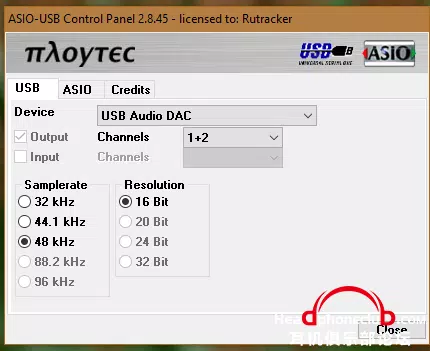
- Multiple Sampling Rate Support – Offers compatibility with 32KHz, 44.1KHz, and 48KHz sampling rates, ensuring flexibility across different audio projects and industry-standard formats.
- Versatile Sample Resolution – Supports 16-bit, 20-bit, and 24-bit audio depth, accommodating both legacy systems and high-resolution audio production needs.
- ASIO 2 Support with ASIO 1 Compatibility – Ensures backward compatibility with older applications while leveraging modern ASIO 2 features for enhanced functionality and stability.
- Dithering Support – Facilitates smooth bit depth conversion between 16-bit and 24-bit environments, preserving audio fidelity during mixing and mastering workflows.
For example, a producer working on a 24-bit project in a 16-bit DAW can use the driver’s dithering feature to maintain clarity and dynamic range. Similarly, a live performer using a USB audio interface with a virtual instrument can benefit from the 4ms latency, ensuring that input and output remain perfectly synchronized. These features collectively deliver a reliable, high-performance audio interface solution tailored to technical precision and creative flexibility.
Interface, UX & Performance
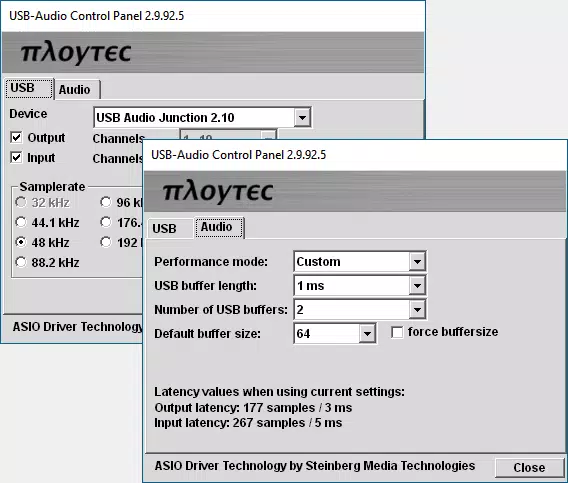
The USB Audio ASIO Driver operates primarily as a background system-level utility, which means it does not feature a traditional user interface. Instead, users configure settings through external applications or system-level audio control panels. This design choice reflects its intended role as a low-level driver rather than a user-facing application.
Navigation is indirect, relying on the host DAW or audio software to detect and select the driver from the available audio device list. The absence of a graphical interface simplifies the user experience for experienced users but may present a learning curve for beginners unfamiliar with ASIO configuration. Despite this, the driver’s lightweight nature—only 1.4 MB in size—suggests minimal system resource consumption.
Although the developer did not list formal performance metrics, the stated 4ms latency indicates a strong focus on real-time responsiveness. The driver is designed to maintain stability during prolonged use, which is essential for long recording sessions or live performances. Compatibility across various hardware configurations is assumed, though specific requirements were not disclosed. Overall, the performance appears optimized for reliability and efficiency in professional audio environments.
Platform Compatibility & Technical Requirements
The USB Audio ASIO Driver is designed exclusively for the Windows platform. It is compatible with Windows operating systems, though specific version requirements were not listed by the developer. The file size is 1.4 MB, indicating a compact and efficient installation package.
Given the driver’s nature, it is likely intended for use on desktop or laptop systems equipped with USB ports and audio interfaces. The developer did not specify minimum OS requirements, hardware specifications, or installation prerequisites. As such, users should ensure their system meets general compatibility standards for running audio software and USB audio devices.
Since the driver is free and distributed without additional dependencies, it can be installed on a wide range of Windows machines. However, users should verify that their audio interface is recognized by Windows before attempting to use the driver. The lack of detailed technical disclosures does not detract from its core functionality but requires users to rely on standard troubleshooting practices for driver installation and configuration.
Pros and Cons
Pros
- Ultra-low latency performance down to 4ms for real-time audio processing.
- Supports multiple sampling rates and bit depths for flexible audio workflows.
- Backward compatibility with ASIO 1 and modern ASIO 2 standards.
- Includes dithering for high-quality bit depth conversion.
- Free to download and install, with no hidden costs or in-app purchases.
Cons
- No graphical user interface; configuration requires external software.
- Specific OS version requirements were not disclosed.
- Compatibility with all USB audio interfaces is not guaranteed.
- Users must manually configure the driver within their DAW or audio software.
- Limited documentation or support materials provided by the developer.
FAQ
Is the USB Audio ASIO Driver safe to download and install?
Yes, the driver is distributed as a free tool by the developer propagamma. It does not contain malware or intrusive behavior based on available information. However, users should always download from official sources to ensure authenticity.
Can I use this driver with any USB audio interface?
The driver is designed for USB audio interfaces that support ASIO protocols. Not all devices are compatible, so users should verify their interface’s ASIO support before installation.
Do I need to update the driver regularly?
Updates are released when improvements or compatibility fixes are implemented. The current version is 1.2.0, released on May 3, 2024. Users should check the developer’s site for new releases.
Is the driver compatible with all DAWs?
It works with any DAW or audio software that supports ASIO. This includes major platforms like Cubase, Logic Audio, Reason, and Native Instruments applications.
Can I use this driver on macOS or Linux?
Currently, the driver is only available for Windows. No versions for macOS or Linux have been released.
Final Thoughts
The USB Audio ASIO Driver stands out as a powerful, no-frills solution for audio professionals seeking low-latency connectivity between their USB audio interfaces and ASIO-compatible software. Its compact size, free access, and robust feature set make it an essential tool for anyone serious about music production, live recording, or real-time audio performance. While it lacks a user-friendly interface and detailed documentation, its technical capabilities are well-suited for experienced users who understand audio driver configuration.
For home studio producers, independent musicians, and audio engineers, this driver delivers a significant performance boost over standard Windows audio drivers. Its support for multiple sampling rates, bit depths, and dithering ensures high-quality audio output across diverse projects. The absence of cost and the focus on stability and speed make it a compelling choice in the professional audio space.
Download USB Audio ASIO Driver now


